Best Payroll Software for UK Small Businesses (2026)

Running payroll in the UK is not optional once you take on a member of staff or pay yourself a salary as a company director. HMRC requires every employer to submit Real Time Information (RTI) reports on or before each payday, operate PAYE correctly, handle automatic pension enrolment, and manage statutory payments — from sick pay to maternity leave. Do any of it wrong and the penalties start at £100 per late filing.
The good news: the right payroll software handles all of this automatically. The bad news: the market is fragmented, the pricing models are wildly different, and the cheapest-looking option is sometimes the most expensive once you account for headcount. This guide compares the main options for UK small businesses in 2026 — including what they actually cost at different team sizes.
Capture employee expenses without the admin. Dext automates receipt capture and VAT coding alongside your payroll software — so nothing falls through the cracks at month end.
TL;DR — The Quick Verdict
- Best overall for businesses with 5+ staff: Sage Payroll Essentials — £10/month flat (5 employees included), full RTI, auto-enrolment, CIS
- Best if you already use Xero: Xero Payroll — £1.50 per employee/month add-on; included on Comprehensive and Ultimate plans
- Best if you already use QuickBooks: QuickBooks Payroll Core — £5/month + £1.50/employee/month
- Best for accountants running multiple payrolls: BrightPay — ~£139/year, unlimited employees, unlimited clients on bureau licence
- Best free option (up to 9 employees): HMRC Basic PAYE Tools — free, but no auto-enrolment or payslip generation
- Best budget desktop option: Moneysoft Payroll Manager — £95/year, Windows only, full features
UK Payroll Software Comparison 2026
| Software | Best For | Starting Price | Per Employee | RTI | Auto-Enrolment | CIS | Cloud |
|---|---|---|---|---|---|---|---|
| Sage Payroll Essentials | 5+ employees, standalone | £10/month | £2/extra (5 included) | ✅ | ✅ All providers | ✅ | ✅ |
| Xero Payroll | Xero accounting users | £1.50/emp/month add-on | £1.50 (Ignite/Grow) | ✅ | ✅ NEST + others | ✅ | ✅ |
| QuickBooks Payroll Core | QuickBooks accounting users | £5/month base | £1.50/employee/month | ✅ | ✅ NEST focus | ⚠️ Basic | ✅ |
| BrightPay | Accountants, payroll bureaux | ~£139/year | Unlimited included | ✅ | ✅ All providers | ✅ | ✅ |
| Moneysoft | Budget-conscious, Windows | £95/year | Unlimited (up to 20) | ✅ | ⚠️ Basic | ✅ | ❌ Desktop |
| HMRC Basic PAYE Tools | Micro-employers, 1–9 employees | Free | Free (up to 9 employees) | ✅ | ❌ Not included | ❌ | ❌ Desktop |
All prices exclude VAT. Pricing correct as of September 2026; verify current rates with each provider before purchasing.
1. Sage Payroll — Best Overall Value for UK Small Businesses
Sage is the most widely used payroll software in the UK, and for good reason. The standalone Sage Payroll Essentials plan starts at £10/month and includes 5 employees — meaning a business with a handful of staff can run fully compliant payroll for less than a monthly gym membership. Beyond 5 employees, you pay £2 per additional employee per month.
There's also an important bundling angle for businesses already using Sage Accounting Standard (£30/month). That plan includes payroll for up to 5 employees at no additional cost. If you have 5 or fewer staff and are already paying for Sage accounting, you may not need a separate Sage Payroll subscription at all.
What Sage Payroll handles:
- RTI submissions to HMRC, automated on every pay run
- Automatic pension auto-enrolment assessment and submissions to all major providers — not just NEST
- P60, P45, and P11D generation
- Statutory Sick Pay (SSP), Statutory Maternity Pay (SMP), Statutory Paternity Pay (SPP), and Shared Parental Pay
- CIS (Construction Industry Scheme) deduction calculations — important for businesses in the construction sector
- Employment Allowance: Sage correctly handles the £10,500 Employment Allowance for 2026/27, reducing your employer NI liability automatically
The three standalone Sage Payroll plans (Essentials £10/month, Standard £20/month, Premium £30/month) add capabilities as you grow: Standard brings advanced reporting and custom payslip branding; Premium adds employee self-service so staff can access their own payslips via a mobile app. All three plans include UK phone support — a meaningful differentiator compared to tools that offer chat only.
UK pricing (excl. VAT, standalone payroll — not bundled with Sage Accounting):
- Essentials: £10/month (5 employees included, £2 per additional)
- Standard: £20/month (5 included, £4 per additional)
- Premium: £30/month (5 included, £6 per additional)
- 90% introductory discount for new customers for the first 3 months
Best for: Any UK employer with 5 or more employees who wants standalone payroll without buying into a full accounting platform. Also the natural choice if you're a construction business needing native CIS payroll handling. If you use Sage for your accounts, payroll is already partly included.
Limitations: Payroll-only — no accounting or invoicing. If you want an all-in-one accounting-plus-payroll tool, you'll either need Sage Accounting Standard (which bundles payroll up to 5 employees) or a different platform entirely.
2. Xero Payroll — Best for Businesses Already on Xero
Xero Payroll is not a standalone product. You need an active Xero accounting subscription before you can add payroll. That sounds like a limitation, but if you're already using Xero for your bookkeeping — and a large proportion of UK small businesses are — it becomes the most efficient option available. Payroll journal entries post automatically into your Xero accounts after each pay run, eliminating the manual double-entry that standalone payroll tools require.
The pricing model is per-employee, per-month. On Xero's Ignite and Grow plans, you pay £1.50 per active employee per month as a payroll add-on. The Comprehensive plan (£55/month) includes payroll for up to 5 employees as part of the subscription, with additional employees charged at £1.50. The Ultimate plan (£70/month) includes payroll for up to 10 employees.
If you're on the Comprehensive plan and have 5 or fewer employees, Xero Payroll costs you nothing extra — it's included. That makes the Comprehensive plan genuinely competitive for growing businesses that want integrated accounting and payroll in one subscription.
As part of our broader look at how Xero, Sage and QuickBooks compare across their full accounting platforms, payroll bundling is one of the clearest differentiators — Sage's flat pricing wins on cost for large teams, while Xero's Comprehensive plan makes sense for medium-sized businesses wanting everything in one place.
What Xero Payroll handles:
- RTI filings, automated on every pay run
- Pension auto-enrolment with NEST and other major providers
- P60, P45 generation
- SSP, SMP, SPP statutory payment calculations
- CIS subcontractor deductions
- Employee self-service via the Xero Me app
- Payroll journals post automatically into Xero accounts — no double-entry
UK pricing (excl. VAT, payroll add-on on top of Xero accounting plan):
- Ignite (£18/month): £1.50/employee/month payroll add-on
- Grow (£39/month): £1.50/employee/month add-on
- Comprehensive (£55/month): payroll included for up to 5 employees; £1.50/emp beyond 5
- Ultimate (£70/month): payroll included for up to 10 employees; £1.00/emp beyond 10
Best for: Businesses already committed to Xero for accounting who want payroll and bookkeeping in one login. Also makes sense for businesses on the Comprehensive or Ultimate plan where payroll is included.
Limitations: Not a standalone option — requires a Xero subscription. For businesses not already on Xero, the mandatory accounting plan makes it expensive compared to Sage Payroll standalone.
3. QuickBooks Payroll — Solid for QuickBooks Accounting Users
Like Xero Payroll, QuickBooks Payroll is an add-on to the QuickBooks Online accounting platform — not a standalone product. If you're already using QuickBooks for bookkeeping, adding payroll keeps everything integrated and avoids manual journal work.
QuickBooks Payroll Core costs £5/month as a base fee, plus £1.50 per employee per month. For a business with 5 employees, that's £12.50/month for payroll on top of your QuickBooks accounting subscription. The Premium tier (£10/month + £2/employee) adds more detailed HR features and reporting.
The main limitation of QuickBooks Payroll is cost at scale. A 10-employee business pays £5 + £15 = £20/month for payroll on Core — similar to Sage Payroll Essentials (£20/month for 10 employees, once you're past the 5 included). But at 20 employees, QuickBooks Core reaches £35/month while Sage Essentials reaches £40/month — reasonably comparable. Beyond that, the models diverge sharply. At 50 employees, QuickBooks Core costs £80/month for payroll alone versus Sage's £100/month — but Sage has no accounting plan required on top, making the like-for-like comparison more complex.
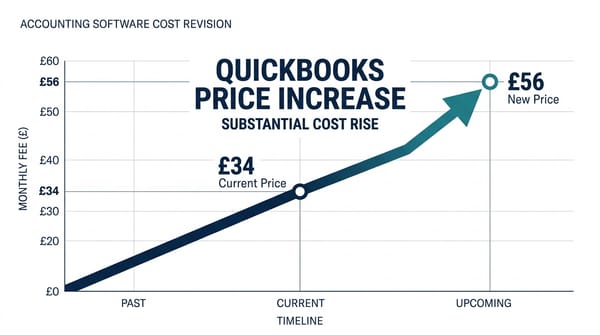
For a detailed look at how QuickBooks' pricing has shifted in 2026, including the 47% increase to some plans, see our analysis of the QuickBooks price hike and whether it changes the switching calculus.
What QuickBooks Payroll handles:
- RTI submissions to HMRC
- Auto-enrolment pension management (primarily NEST integration)
- P60, P45 generation
- SSP, SMP statutory payment calculations
- Payroll data syncs automatically to QuickBooks accounts
UK pricing (excl. VAT, payroll add-on):
- Payroll Core: £5/month + £1.50/employee/month
- Payroll Premium: £10/month + £2/employee/month
Best for: Businesses already using QuickBooks Online for accounting who want payroll integrated in the same platform. At low headcounts (1–8 employees), the Core plan is cost-effective. CIS support is limited compared to Sage.
Limitations: Requires a QuickBooks Online subscription. CIS handling is not as comprehensive as Sage. Auto-enrolment setup requires more manual configuration for pension providers other than NEST.
4. BrightPay — Best for Accountants Running Multiple Client Payrolls
BrightPay sits in a different category from the tools above. It's primarily used by accountants, bookkeepers, and payroll bureaux who manage payroll for multiple clients — but it's also a strong choice for employers who want unlimited-employee payroll at a flat annual fee.
The BrightPay Employer licence costs approximately £139/year (ex-VAT) and covers unlimited employees. For a business with 10 employees, that's around £11.58/month — significantly cheaper than any of the per-employee options above. The bureau licence allows accountants to run payroll for multiple employers under a single subscription.
BrightPay is cloud-based and HMRC-recognised. It handles RTI, auto-enrolment across all pension providers, P60/P45 generation, and statutory payments. The accounting integration story is less seamless than Xero or QuickBooks (BrightPay uses manual export/import rather than a live API connection), but for businesses whose accountant manages payroll separately from their bookkeeping software, that rarely matters.
BrightPay is particularly popular with UK accountancy practices. If your accountant runs your payroll for you, there's a reasonable chance they're using BrightPay already — which affects whether you pay for your own licence or pay your accountant to manage it on theirs.
UK pricing (excl. VAT, 2026/27 tax year):
- Employer licence: ~£139/year (unlimited employees)
- Bureau licence: higher tier, covers multiple employers
Best for: Accountants and bookkeeping practices managing payroll for clients. Also works well for employers with 15+ employees who want predictable flat-rate annual pricing without per-head charges.
Limitations: No native live accounting integration (manual export required). Less intuitive for business owners new to payroll compared to Xero or QuickBooks.
5. Moneysoft Payroll Manager — Best Budget Option (Windows Only)
Moneysoft Payroll Manager is the cheapest fully featured paid payroll software on the UK market, at £95/year (excl. VAT) for up to 20 employees. It covers RTI filing, auto-enrolment, P60/P45 generation, statutory payments, and CIS — everything a small employer needs.
The catch: it's Windows-only desktop software. There is no cloud version, no mobile access, and no live accounting integration. If you're comfortable running payroll from a Windows PC and don't need remote access, Moneysoft is outstanding value. A 10-employee business pays £95/year — roughly £7.92/month — for the same core compliance functionality as tools costing four to five times more.
Moneysoft is widely used by small practices and employers who prioritise cost over convenience features. It's HMRC-recognised for RTI and produces payslips, P60s, and P45s correctly. Auto-enrolment support is more basic than Sage — it calculates contributions and produces files, but with less automation around provider submission.
UK pricing (excl. VAT):
- £95/year for up to 20 employees
- £190/year for 20–100 employees
Best for: Cost-conscious employers on Windows who are comfortable with desktop software and don't need accounting integration or remote access.
Limitations: Windows-only. No cloud access. Limited auto-enrolment automation. No mobile app.
6. HMRC Basic PAYE Tools — Free for Very Small Employers
HMRC provides its own free payroll tool — Basic PAYE Tools — for employers with up to 9 employees. It handles RTI submissions correctly, which is the core legal requirement. It calculates PAYE and National Insurance, produces P60s at year end, and integrates directly with HMRC's systems.
What it doesn't do: auto-enrolment pension assessment, payslip generation, statutory pay calculations beyond basic SSP/SMP lookup, or CIS deductions. It also doesn't integrate with any accounting software — payroll journal entries have to be entered manually into your bookkeeping system.
For a sole trader who has just taken on their first employee and wants to test payroll before committing to paid software, Basic PAYE Tools is a reasonable starting point. For any employer with more than 2 or 3 employees, the missing features — particularly auto-enrolment — make it inadequate as a long-term solution. Auto-enrolment is a legal obligation for eligible workers, and the consequences of non-compliance include fines from The Pensions Regulator.
UK pricing: Free
Best for: Micro-employers with 1–2 employees who are comfortable managing auto-enrolment and payslips separately.
Limitations: No auto-enrolment, no payslips, no CIS, desktop-only, not suitable beyond a handful of employees.
What Does Payroll Actually Cost at Different Headcounts?
The pricing models above look simple in isolation but produce very different outcomes as your team grows. This table models the monthly cost for each tool at common UK small business headcounts. Xero and QuickBooks totals assume the cheapest available accounting plan (Xero Ignite at £18/month; QuickBooks Simple Start at £16/month). Sage Payroll Essentials is standalone — add your accounting plan on top if applicable.
| Employees | Sage Essentials (standalone payroll) | Xero Ignite + Payroll (accounting included) | QB Simple Start + Payroll Core (accounting included) | BrightPay (payroll only) |
|---|---|---|---|---|
| 1 | £10 | £19.50 | £22.50 | £11.58 |
| 5 | £10 | £25.50 | £28.50 | £11.58 |
| 10 | £20 | £33 | £36 | £11.58 |
| 20 | £40 | £48 | £51 | £11.58 |
| 50 | £100 | £93 | £96 | £11.58 |
Note: Xero and QuickBooks totals include the cheapest available accounting plan. Sage Essentials is payroll-only — add Sage Accounting Standard (£30/month) if you need accounting too. All prices ex-VAT. Correct as of September 2026.
The pattern is clear. At low headcounts (1–5 employees), Sage Essentials wins on payroll-only cost. At 50+ employees, BrightPay's flat-rate annual fee makes it by far the cheapest option — though it lacks live accounting integration. Xero and QuickBooks become more compelling when you factor in that their prices include your full accounting software, not just payroll.
Don't Forget Expense Capture Alongside Payroll
Payroll software handles employee wages, PAYE, and pension contributions. What it doesn't handle is the messier side of employee costs: expense claims, mileage, supplier receipts, and petty cash. These are separate workflows that need their own solution — and they're where small businesses consistently lose money through missing receipts and unclaimed VAT.
Dext handles this side of the equation: snap receipts on a phone, forward supplier emails, and every transaction is automatically coded, VAT-extracted, and pushed to your accounting software. It integrates with Xero, QuickBooks, and Sage — whichever payroll platform you choose. For practices that process high volumes, Receipt Bot offers a more budget-friendly alternative at around 20% of first-year subscription costs returned as commission.
For a full comparison of receipt capture tools alongside accounting software, see our guide to the best receipt capture software for UK bookkeepers in 2026.
Which Payroll Software Should You Choose?
You already use Xero for accounting → Use Xero Payroll. The integration alone is worth it. If you're on Comprehensive or Ultimate, payroll is partly or fully included anyway.
You already use QuickBooks for accounting → Add QuickBooks Payroll Core. It handles the essentials cleanly and keeps your accounts integrated. Monitor cost as your team grows past 15 employees.
You use Sage Accounting (or no accounting software yet) → Sage Payroll Essentials. Best value for 5+ employees, best CIS support, best pension provider breadth, UK phone support included.
You're a construction business with CIS obligations → Sage Payroll or Xero Payroll. Both handle CIS deduction calculations properly. See our guide to accounting software for UK CIS subcontractors for the full picture.
You're an accountant running payroll for multiple clients → BrightPay bureau licence. Flat annual fee, unlimited clients, proper bureau workflow.
You have 1–2 employees and want to minimise costs → HMRC Basic PAYE Tools for RTI, then handle auto-enrolment separately via The Pensions Regulator's NEST scheme. Add Moneysoft (£95/year) when you need proper payslips and more support.
You're a sole trader without employees → You don't need payroll software unless you're paying yourself a salary as a company director. For self-employed income tracking, see our guide to the best accounting software for UK sole traders instead.
Frequently Asked Questions
What is RTI and which payroll software supports it?
Real Time Information (RTI) is the system HMRC uses to receive payroll data. Employers must submit an FPS (Full Payment Submission) to HMRC on or before every payday, and an EPS (Employer Payment Summary) when applicable. Every payroll tool listed above supports RTI — it's a legal requirement, and any HMRC-recognised payroll software must handle it. HMRC maintains an official list of recognised software at gov.uk/payroll-software.
What is automatic pension enrolment and does my payroll software handle it?
Auto-enrolment requires employers to enrol eligible workers into a qualifying workplace pension scheme and contribute a minimum of 3% of qualifying earnings. Payroll software that supports auto-enrolment handles the eligibility assessment, calculates contributions, and produces the data files pension providers need. Sage, Xero, and QuickBooks all support auto-enrolment across major providers. HMRC Basic PAYE Tools and Moneysoft have more limited support — you may need to handle pension submission files manually.
Does payroll software handle the Construction Industry Scheme (CIS)?
CIS applies to contractors who pay subcontractors for construction work. Under CIS, contractors must deduct tax at source (20% for registered subcontractors, 30% for unregistered) and submit monthly returns to HMRC. Sage Payroll handles CIS calculations natively and is the most commonly recommended tool for construction businesses. Xero Payroll also supports CIS subcontractor deductions. QuickBooks has more basic CIS support. For a detailed breakdown, see our full comparison of accounting software for CIS subcontractors.
What is the Employment Allowance and does payroll software handle it?
The Employment Allowance allows eligible employers to offset up to £10,500 of their annual employer National Insurance liability in 2026/27 — up from £5,000 in 2025/26. You declare your eligibility through your payroll software when submitting your first EPS of the tax year. Sage, Xero, and QuickBooks all handle Employment Allowance correctly. Sole directors who are the company's only employee are not eligible.
Can I switch payroll software mid-year?
Yes, but it requires careful handling. You'll need to export your year-to-date payroll data from your existing software and import it into the new tool to ensure cumulative totals (particularly P60 year-end figures) are accurate. Most providers have a data migration wizard. The ideal switching window is at the start of a tax year (6 April), but mid-year moves are manageable if you follow the import process correctly. If you're switching accounting software at the same time, read our comparison of Sage, Xero, and QuickBooks to make sure your accounting and payroll choices align.
Related Reading
- Best Accounting Software for UK Sole Traders (2026) — if you don't have employees yet, start here
- Best Accounting Software for UK CIS Subcontractors (2026) — construction industry CIS and payroll deep-dive
- Sage vs Xero vs QuickBooks UK (2026) — full accounting platform comparison to choose the right base
- Best Receipt Capture Software for UK Bookkeepers (2026) — expense capture to run alongside payroll
Affiliate disclosure: Some links in this article are affiliate links. If you sign up through them, we may earn a commission at no extra cost to you. We only recommend tools we've genuinely assessed.